

Cloud adoption is now the default, and the security risks have grown with it.
IBM’s Cost of a Data Breach Report 2025 found that breaches spanning public cloud, private cloud, and on-premises environments cost an average of $5.05 million, the highest of any setup, and take 276 days to detect.
Moving to the cloud does not move the responsibility for securing it. It changes how that responsibility is shared and how fast attackers can move once they get in. Strong cloud security closes those gaps before they cost you.
This guide explains what cloud security is, why it matters, how it works, the risks it defends against, and the practices that actually keep your data safe.
What Is Cloud Security?
Cloud security is the set of policies, tools, and practices that protect data, apps, and systems hosted in the cloud. It is cybersecurity applied to systems that no longer sit inside your own building.
The key difference is that responsibility is shared. Your cloud provider secures the underlying infrastructure: the data centres, the physical hardware, and the global network. You are responsible for everything you put on top of it, including who can access what, how your data is stored, and how each service is set up.
This is the part most organisations get wrong. Cloud security is not something you buy from a provider. It is something you design, configure, and maintain in your own environment, using the controls the provider gives you.
Why Is Cloud Security Important?
Cloud security is not just an IT concern. It is what protects the data, operations, and trust your business depends on. Here are four reasons it matters.
1. Protecting sensitive data
Most businesses now hold their most valuable data in the cloud: customer records, payment details, intellectual property, and internal communications. Cloud security keeps that data confidential and unaltered, both while it sits in storage and while it moves between systems. In most regions, protecting it is also a legal duty.
2. Supporting business continuity
When an attack hits, the cost is not just in stolen data. It is also in the hours or days your business cannot operate. Strong cloud security keeps services running during an incident, and gets them back faster afterwards through backups, redundancy, and clear recovery plans.
3. Reducing cybersecurity risks
The cloud expands what an attacker can target. APIs, misconfigured storage, weak access controls, and third-party services all create new ways that did not exist on traditional networks. Cloud security closes these gaps before they can be exploited by combining strong access controls, monitoring, and consistent configuration.
3. Meeting compliance requirements
Regulations like the GDPR, HIPAA, PCI DSS, and Indonesia’s Personal Data Protection Law (UU PDP) all set standards for how data must be protected, including in the cloud. Falling short means fines and lost contracts, and larger partners increasingly require proof of strong cloud security before they will work with you.
The consequences are real. On 22 May 2023, the Irish Data Protection Commission fined Meta Platforms Ireland €1.2 billion for unlawfully transferring European users’ personal data to the United States, the largest GDPR fine ever issued.
The case shows how seriously regulators now treat cross-border data handling, and how exposed any organisation can be without strong cloud security in place.
How Cloud Security Works
Cloud security works as a system of layered controls. The seven parts below cover everything from who is responsible for what, through to how breaches get detected and contained.
1. Shared Responsibility
This is the foundation of cloud security and the part most often misunderstood. Your cloud provider is responsible for the security of the cloud: the physical infrastructure, the global network, and the underlying services.
You are responsible for security in the cloud: your data, your user accounts, how each service is configured, and which applications you deploy. The split varies slightly between providers and service types, but the principle is consistent: the provider gives you the controls; you decide how to use them.
2. Identity and Access Management (IAM)
IAM controls who can access what in your cloud environment. It covers user identities, permissions, authentication, and the policies that govern access decisions.
In the cloud, where systems are reachable from anywhere, identity becomes the new perimeter, since there is no longer a physical network boundary keeping outsiders out. Multi-factor authentication, role-based access control, and the principle of least privilege are the core mechanisms.
3. Data Protection
Data protection keeps your information confidential and intact, whether it is sitting in cloud storage or moving between services. The two main tools are encryption (using standards like AES-256 for stored data and TLS for data in transit) and key management (controlling who can decrypt what). Classifying your data by sensitivity, so the most valuable records get the strongest protection, is the practical starting point.
4. Network Security
Even in the cloud, network controls still matter. Virtual firewalls, network segmentation, and secure connectivity (such as VPNs or private links) limit how traffic flows between services and prevent unauthorised connections from reaching sensitive systems.
The shift from on-prem is that these controls are now software-defined, configured through the cloud platform rather than installed as hardware.
5. Monitoring and Threat Detection
Monitoring is how you spot problems quickly when something does go wrong. Cloud platforms generate detailed logs of every action: who signed in, what was accessed, which services were configured, and when.
Security teams collect and analyse those logs in real time, watching for unusual patterns that signal an attack in progress. Without monitoring, breaches can run for months before anyone notices.
6. Resilience and Recovery
Resilience is the ability to keep operating during an incident, and to recover fast afterwards. Backups, redundancy across regions, and tested recovery plans are what turn a serious attack into something the business can survive.
The cloud makes resilience easier in principle, providers offer built-in redundancy, but it only works if you have configured it correctly and tested that it works.
7. Governance and Compliance
Governance is the layer that ties everything together. It covers the policies you set, the standards you align to (such as ISO 27001, the NIST CSF, or local data protection laws), and the audits that prove your programme is working.
Good governance turns cloud security from a set of disconnected controls into a programme you can explain, measure, and improve over time.
Types of Cloud Environments
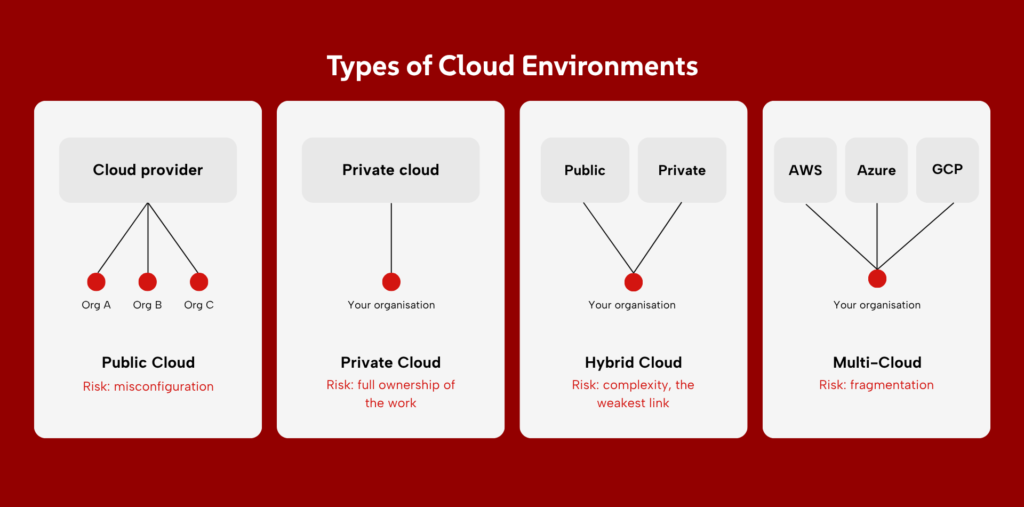
Not all cloud deployments are the same. The four models below differ in who owns the infrastructure, who uses it, and what that means for security. Most businesses end up using more than one.
1. Public Cloud
A public cloud is shared infrastructure owned and run by a third-party provider, such as AWS, Microsoft Azure, or Google Cloud. You rent the computing power, storage, and services you need, while the provider handles the hardware and underlying network.
It is fast to set up and easy to scale, but the security challenge is configuration: most public-cloud breaches happen because customers leave services misconfigured, not because the provider was breached.
2. Private Cloud
A private cloud is infrastructure dedicated to a single organisation, either hosted in-house or by a provider. It offers more control over data, access, and customisation, which is why it is common in regulated industries like banking and healthcare.
The trade-off is responsibility: with no shared platform handling the basics, your team owns more of the security work, including patching, monitoring, and physical safeguards.
3. Hybrid Cloud
A hybrid cloud combines public and private cloud, often with on-premises systems as well, so workloads can move between them based on cost, performance, or compliance needs. It gives organisations flexibility, but it also creates a larger and more complex attack surface. Securing it means consistent policies, identity controls, and monitoring across every environment, since attackers will find the weakest link first.
4. Multi-Cloud
A multi-cloud setup uses two or more public cloud providers at the same time, often to avoid vendor lock-in or to use the strongest service from each.
The security challenge is fragmentation: each provider has its own controls, dashboards, and configuration models, which can make it hard to maintain a single, consistent security posture. Strong multi-cloud security depends on tools and policies that work across providers, not on managing each one separately.
Common Cloud Security Risks
The cloud creates new attack surfaces that traditional security models did not anticipate. The eight risks below are the ones organisations face most often, and most cloud breaches involve at least one of them.
1. Misconfigured Cloud Resources
Misconfiguration is the single most common cause of cloud breaches. It happens when storage buckets are left publicly accessible, permissions are set too broadly, or security features are disabled by mistake.
The Cloud Security Alliance ranked misconfiguration and inadequate change control as the top cloud threat in its 2024 Top Threats report. The cause is usually human error in complex environments, not malicious activity.
2. Data Breaches
A data breach happens when sensitive information is accessed, stolen, or exposed without authorisation. In the cloud, breaches often stem from weak access controls, misconfigured services, or exploited APIs.
The impact is the same as any breach (financial loss, regulatory penalties, reputational damage), but the speed at which data can move out of a cloud environment makes early detection critical.
3. Weak Access Controls
Identity is the new perimeter in the cloud, so weak access controls create direct paths in. Common issues include shared accounts, missing multi-factor authentication, overly broad permissions, and accounts that are never reviewed or removed.
One compromised credential can give an attacker access to systems across an entire cloud estate, sometimes within minutes.
4. Insecure APIs
APIs are how cloud services talk to each other and to your applications. When they are exposed to the internet without proper authentication, rate limiting, or input validation, they become a direct entry point. Insecure APIs are especially dangerous because they can give attackers programmatic access to data and services at scale.
5. Insider Threats
Insider threats come from people inside your organisation who misuse their access, whether on purpose or by accident.
In the cloud, the risk is amplified because permissions tend to be broader and harder to track. A single employee with too much access can expose huge volumes of data in seconds, and the activity looks legitimate to most monitoring tools.
Also Read: Managing Insider Threats: Behavioral Analytics in a Zero Trust Architecture
6. Malware and Ransomware
Malware in the cloud spreads differently from on-prem. Attackers target cloud-hosted applications, storage buckets, and connected services, encrypting or stealing data before defenders can respond. Ransomware in particular has shifted to target backup systems and cloud storage, since those are the assets businesses rely on to recover.
7. Third-Party Risks
Most cloud environments include dozens of third-party services, integrations, and SaaS applications. Each one creates a potential way in. A breach at a single vendor (whether through stolen credentials, a compromised software update, or a misconfigured integration) can give attackers a route into your systems, even if your own controls are strong.
8. Shadow IT and SaaS Sprawl
Shadow IT is the use of cloud services that the security team does not know about. Employees sign up for SaaS tools, share data through unsanctioned apps, or spin up cloud resources without going through procurement. The result is data flowing through systems that have no security oversight, no monitoring, and often no encryption.
Challenges When Implementing Cloud Security
Cloud security is a mature discipline, but adopting it well is still hard. The five challenges below come up in most organisations. Knowing what to expect makes them easier to plan for.
1. Maintaining visibility across cloud environments
You cannot protect what you cannot see. In the cloud, assets are created and destroyed constantly, often outside the security team’s view, which makes a full picture of what exists genuinely difficult.
Cloud workloads spin up in minutes, SaaS apps appear without procurement approval, and data flows through services no one has mapped. Closing this gap means using tools and processes that give continuous, real-time visibility into every cloud asset, account, and configuration.
2. Managing multiple cloud platforms
Most organisations now run across two or more cloud providers, each with its own controls, dashboards, and configuration models. Skills that apply to AWS do not transfer cleanly to Azure or Google Cloud, and a policy that works in one platform may not exist in another.
Managing this well takes either deep expertise in every platform, which is rare, or unified tools that work across all of them.
3. Keeping up with compliance requirements
Cloud regulations change quickly, and they vary by region, sector, and even data type. GDPR, HIPAA, PCI DSS, Indonesia’s PDP Law, and Singapore’s CSA requirements all set different rules for how cloud data must be handled, and they update regularly.
Staying compliant means tracking what applies, implementing the right controls, and proving it during audits, which adds steady administrative weight
4. Addressing skills and resource gaps
Cloud security expertise is scarce, and demand keeps growing. Most teams are short on people who can design, monitor, and respond to cloud-specific threats, and training existing staff takes time the business often does not have.
The gap usually widens as cloud adoption accelerates, which is why many organisations turn to managed services to cover what they cannot staff internally.
5. Balancing security and business agility
The cloud’s main appeal is speed. Teams can launch services in hours that used to take months, but every new service is also a new attack surface. Too little security slows the business down through breaches and incidents; too much slows it down through approval queues and bottlenecks.
Finding the balance means embedding security into the development and deployment process, not bolting it on at the end.
Cloud Security Best Practices
Knowing the risks is one thing; closing them is another. The seven practices below are the highest-impact actions for most organisations. Start at the top and work down.
1. Enable Multi-Factor Authentication (MFA)
MFA is the single highest-impact control for cloud accounts. Even if an attacker steals a password, they cannot get in without the second factor. Microsoft’s own research found that MFA blocks more than 99.2% of account compromise attacks.
Turn it on for every cloud service, every admin account, and every user, especially for the management consoles of AWS, Azure, and Google Cloud, where one compromised admin login can expose everything.
2. Apply the principle of least privilege
Give each user, service, and application only the cloud permissions they need to do their job, and no more. In practice, that means using role-based access control (RBAC), reviewing permissions regularly, and removing access the moment someone changes role or leaves.
Cloud platforms make this easier by offering built-in role templates, use them rather than handing out broad administrator access by default.
3. Encrypt sensitive data
Turn on encryption for both stored data (at rest) and data moving between systems (in transit). Most cloud providers offer this with one click, but the default is not always on, and that is where exposure happens.
Use AES-256 for storage and TLS 1.2 or 1.3 for transfers, and manage your own encryption keys where possible, since whoever holds the key controls the data.
4. Regularly review cloud configurations
Misconfigurations are the most common cause of cloud breaches, and they often happen quietly: a developer opens a storage bucket for testing and forgets to close it, or a permission is set too broadly during a rushed deployment.
Use cloud security posture management (CSPM) tools to scan your environment continuously, and run formal configuration reviews at least quarterly. Catching these early is cheaper than cleaning up afterwards.
5. Monitor cloud activity
Set up continuous monitoring across every cloud platform you use, with alerts for unusual sign-ins, large data transfers, configuration changes, and access from new locations.
Most cloud providers offer native logging (AWS CloudTrail, Azure Monitor, Google Cloud Audit Logs), but the logs only help if someone is watching them. Smaller teams often outsource this to a managed security service that watches around the clock.
6. Keep systems updated
Cloud services, SaaS apps, and the libraries your applications depend on all need regular updates.
Most cloud platforms patch their underlying infrastructure automatically, but the software running on top of it, including your operating systems, containers, and third-party dependencies, is your responsibility. Turn on automatic updates where you can, and put a process in place for the systems that cannot update themselves.
7. Have an incident response plan
Assume a breach will happen, and decide how you will respond before it does.
A cloud incident response plan should name who isolates the affected systems, who notifies customers and regulators, and who restores operations. Test the plan at least once a year, since the worst time to discover a gap is during a real incident.
Building a Stronger Cloud Security Strategy
Cloud security is an architecture you design and operate, across every cloud service you use, with controls that change as the cloud itself changes. The hard part is not buying the right products. It is running the programme that ties them together.
Zentara helps organisations strengthen cloud security through risk assessments, security architecture reviews, configuration hardening, continuous monitoring, and cloud-focused testing services.
Ready to take a closer look at your cloud security posture?
Explore Zentara’s Cloud Security services and discover how we can help you build a more secure and resilient cloud environment.