

Nearly one in five businesses that suffer a cyberattack never recovers. A Mastercard survey of over 5,000 business owners across four continents found that 46% had been attacked, and almost 20% of them later closed or went bankrupt.
The lesson is simple: this is not just a big-company problem. Any business with data worth stealing is a target.
Most attacks come down to a few recurring threats: phishing emails that steal logins, ransomware that locks your files for payment, and weak access controls that let one breach spread.
The good news is that these exploit the same handful of fixable weaknesses. Strong cybersecurity is not a single product you buy. It is a set of practices you put in place and maintain, each one closing a gap an attacker would otherwise use.
This guide covers 20 practical cybersecurity tips for businesses. The early tips block the widest range of attacks for the least effort, and the later ones build the depth that keeps your defences holding as threats change.
The 20 Cybersecurity Tips for Business
Here are the 20 cybersecurity best practices every business should follow. Start at the top and work your way down.
1. Turn on Multi-Factor Authentication (MFA)
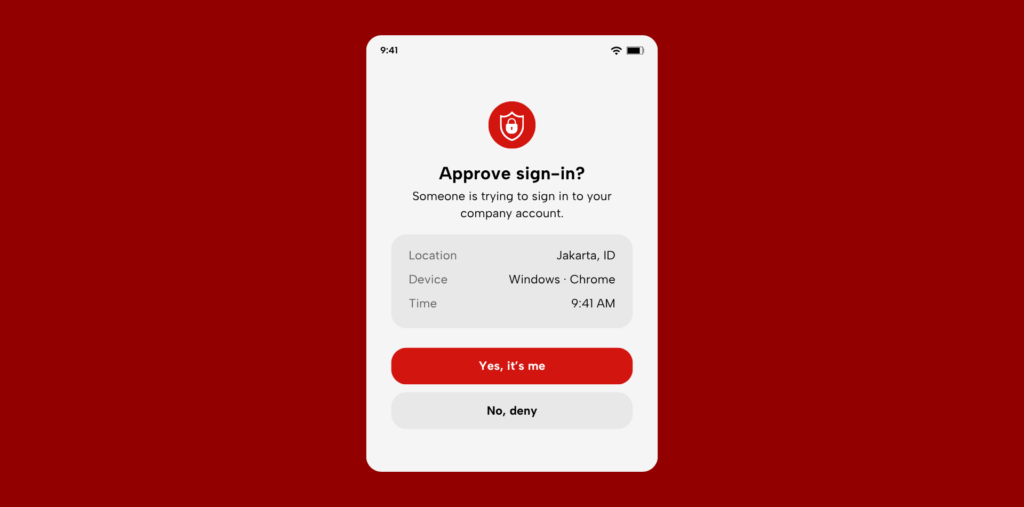
This is the single highest-impact step on the list, and one of the easiest. Multi-factor authentication (MFA) asks for a second proof of identity beyond your password, usually a code from an app, a tap on your phone, or a fingerprint. So even if an attacker steals a password, they still cannot get in.
The numbers make the case. Microsoft’s own research found that MFA blocks more than 99.2% of account compromise attacks. Turn it on everywhere it is offered, starting with email, banking, and admin accounts, the ones an attacker wants most.
2. Use strong passwords and a password manager
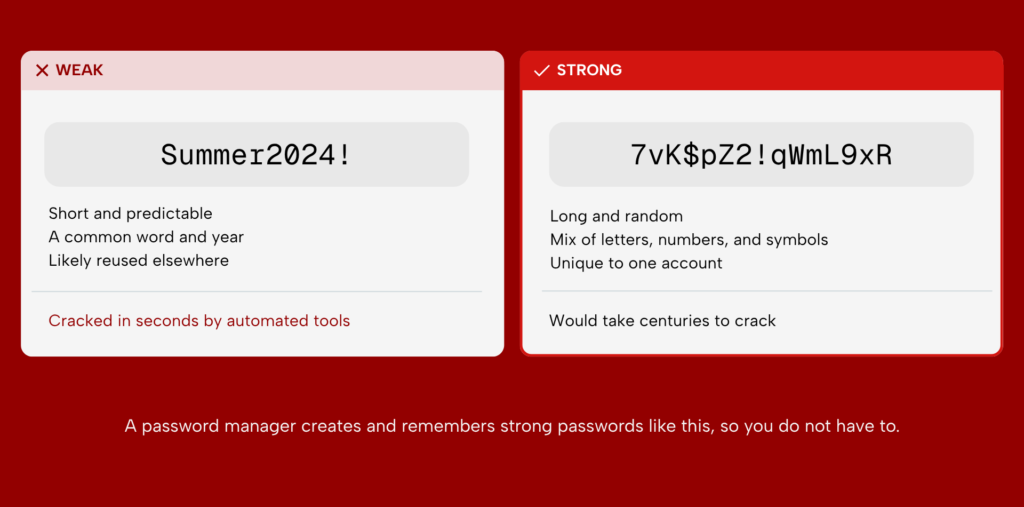
Weak and reused passwords are one of the easiest ways into a business. If one account is breached, attackers try the same password everywhere else, and reuse means it often works.
A password manager fixes this. It creates a long, unique password for every account and remembers them all, so your team does not have to. They only need to recall one master password. Make a manager standard across the organisation, and you remove the two habits attackers count on: weak passwords and reused ones.
3. Keep software and systems updated
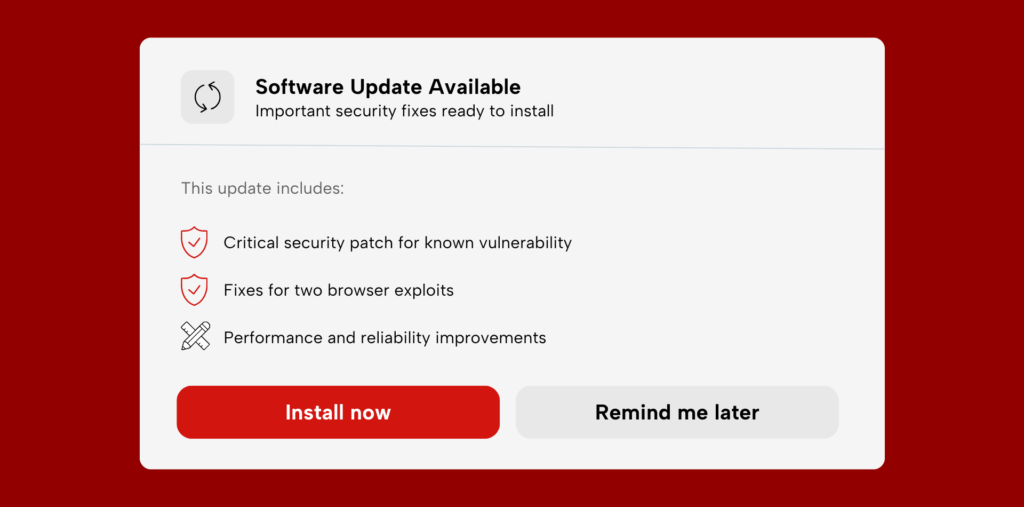
Most successful attacks do not use clever new tricks. They exploit known flaws that a software update had already fixed, simply because no one installed it. Every unpatched device is an open door: operating systems, apps, and even router firmware.
Turn on automatic updates wherever you can, and set a clear process for the systems that cannot update themselves.
The Verizon Data Breach Investigations Report 2025 found that exploiting known vulnerabilities now accounts for 20% of all breaches, a sharp rise as attackers race to use flaws before they are patched.¹ The goal is simple: close the gaps before someone walks through them.
4. Train your team to spot threats
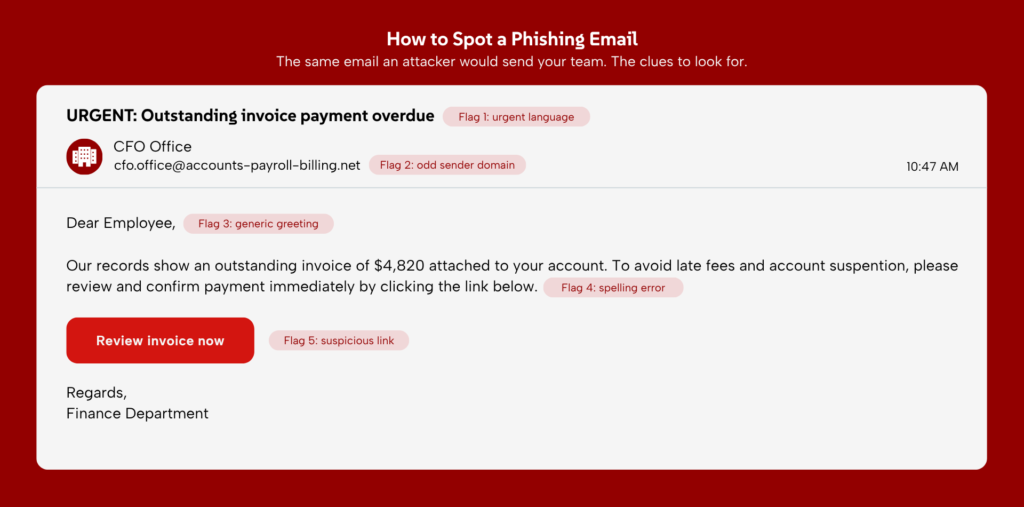
Most breaches start with a person, not a system, usually someone clicking a link they should not have. The Verizon Data Breach Investigations Report 2025 found that 60% of breaches involved a human element. That makes your staff either your strongest defence or your weakest.
Run regular, practical training on how to spot phishing emails and social engineering, and back it up with simulated phishing tests that show people what a real attempt looks like.
The aim is simple: a team that pauses before clicking, and knows how to report something suspicious when they see it.
5. Back up your data regularly
A good backup turns a ransomware attack from a disaster into an inconvenience. If your files are locked, you restore from a clean copy instead of paying a ransom.
Follow the 3-2-1 rule:
- Three copies of your data
- Two different types of storage
- One copy kept offline or off-site
The offline copy matters most, because ransomware that reaches your network cannot encrypt a backup it cannot touch. Just as important, test your backups regularly. An untested backup is not a backup, and the worst time to find out it failed is in the middle of a recovery.
6. Install antivirus and Endpoint Protection
Every device that connects to your network is a potential way in: laptops, phones, servers, even the personal devices your staff use for work. Each one needs protection. Antivirus is the baseline. It catches known malware by matching it against a list of known threats.
Endpoint Detection and Response (EDR) goes further. Instead of only looking for threats it already recognises, it watches for suspicious behaviour, which is how it catches new attacks that antivirus would miss. Deploy protection on every device, cover personal ones used for work, and keep it updated so it stays effective.
7. Check your vendors and supply chain
Your security is only as strong as the partners you rely on. Every vendor, software provider, and contractor with access to your systems or data is a potential way in, and attackers increasingly target the weakest link in that chain.
The Verizon Data Breach Investigations Report 2025 found that third-party involvement in breaches doubled to 30% in a single year. Vet vendors before you onboard them, write security expectations into contracts, and review access for anyone who no longer needs it.
8. Give staff only the access they need
Not everyone needs access to everything. The principle of least privilege means each person can reach only the systems and data their role requires, and nothing more. A marketing assistant has no reason to open payroll records, and a sales login should not be able to change server settings.
If an account is compromised, limited access keeps the attacker boxed into a small area instead of handing them the whole organisation. Review permissions regularly, and remove access the moment someone changes role or leaves, since old accounts with broad access are a common way in.
9. Secure your Wi-Fi network
An unsecured wireless network is an open door into everything connected to it. If an attacker can reach your Wi-Fi, they can often reach your systems. A few steps close that door:
- Turn on strong WPA3 encryption (or WPA2 if your hardware is older)
- Change the default router name and password, which attackers already know
- Set up a separate guest network so visitors never touch your business systems
Never run business systems over public Wi-Fi either. On a network you do not control, your traffic can be intercepted.
10. Use a firewall and separate your networks
A firewall is your network’s gatekeeper. It controls what traffic is allowed in and out, blocking unauthorised connections before they reach your systems. Every business network should sit behind one.
Then go a step further with network segmentation: dividing your network into separate zones so a breach in one cannot spread to the rest. If an attacker gets into the guest Wi-Fi, segmentation keeps them away from your servers and financial systems.
The two work together: the firewall guards the perimeter, and segmentation limits how far anyone who slips past can go.
11. Use a VPN for remote work
When staff work from home, a cafe, or an airport, their connection runs over networks you do not control, where data can be intercepted. A virtual private network (VPN) fixes this by creating a private, encrypted tunnel between the worker and your systems. Anyone trying to snoop on the connection sees only scrambled data.
Require a VPN for everyone working off-site. Choose a business-grade one rather than a free consumer app, since free VPNs often log your activity or sell your data, which defeats the point.
12. Encrypt your sensitive data
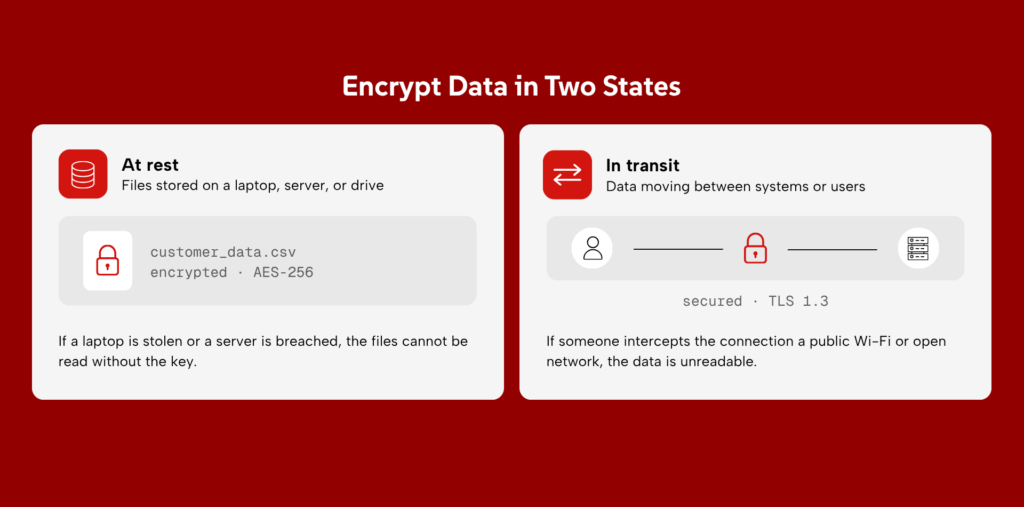
Encryption scrambles data so it is unreadable to anyone without the key. Even if an attacker steals a file or intercepts a transfer, encrypted data is useless to them.
Apply it in two places. Encrypt data at rest, meaning the files sitting on your laptops, servers, and drives, so a stolen device does not become a data breach. And encrypt data in transit, meaning information as it travels between systems, so it cannot be read if intercepted.
The common standards, AES-256 for stored data and TLS for transfers, are the baseline, and most modern tools support them by default.
13. Choose secure cloud storage
Most businesses now keep critical data in the cloud, but a common mistake is assuming the provider handles all the security. They do not. Cloud security is shared: the provider protects the infrastructure, but you are responsible for who can access your data and how.
That gap is where things go wrong. Misconfigured cloud storage, like a folder accidentally left open to the public, is one of the most common causes of data leaks. Choose a provider with strong security certifications, then set permissions carefully and check them regularly so nothing is exposed by mistake.
14. Limit physical access to devices
Not every breach happens over the network. A stolen laptop, an unlocked server room, or an unattended desk can hand an attacker direct access to your systems. The fix is to treat physical access as seriously as digital access:
- Keep servers and network equipment in a locked room
- Set every device to lock its screen automatically after a short idle time
- Turn on full-disk encryption, so a lost or stolen device is useless without the password
That last point is the safety net: even if a laptop is stolen, encryption means the data on it cannot be read.
15. Secure payment and card data
If your business takes card payments, that data is a prime target for attackers and a regulated responsibility. Mishandling it can mean fines as well as a breach.
The simplest protection is to not hold the data at all. Use a reputable payment processor that handles card details for you, so the sensitive numbers never sit on your systems to be stolen.
Beyond that, follow the Payment Card Industry Data Security Standard (PCI DSS), the baseline rules for handling card data safely, and keep payment systems separate from the rest of your network.
16. Run regular risk assessments
You cannot protect what you have not mapped. A risk assessment is a structured review that answers three questions: what data and systems do you have, what could go wrong, and where are you most exposed?
Run one at least once a year, and again after any major change to your systems, like a new app, office, or supplier. The result is a prioritised list of what to fix first, which turns security from guesswork into a clear plan. It is also the step that makes every other tip on this list more effective, because you know where to apply them.
17. Test your defences with penetration testing
A risk assessment finds gaps on paper. A penetration test proves them in practice. You hire ethical hackers to break into your systems the same way a real attacker would, then they hand you a report of exactly what they got through and how.
This tells you which weaknesses are real and which are not, so you spend your effort fixing the ones that actually matter. Run a test at least once a year, and after any big change to your systems.
18. Monitor your systems continuously
Many attacks are not loud. An intruder can sit inside a network for weeks or months, quietly stealing data, before anyone notices. The longer they go undetected, the more damage they do.
Continuous monitoring watches your systems in real time and flags unusual activity as it happens, so a threat is caught while it is unfolding, not discovered months later. It is the difference between stopping an attack in progress and reading about it in a breach report.
Watching systems around the clock is hard for a small team to do alone, which is why many businesses use a managed service.
19. Have an incident response plan
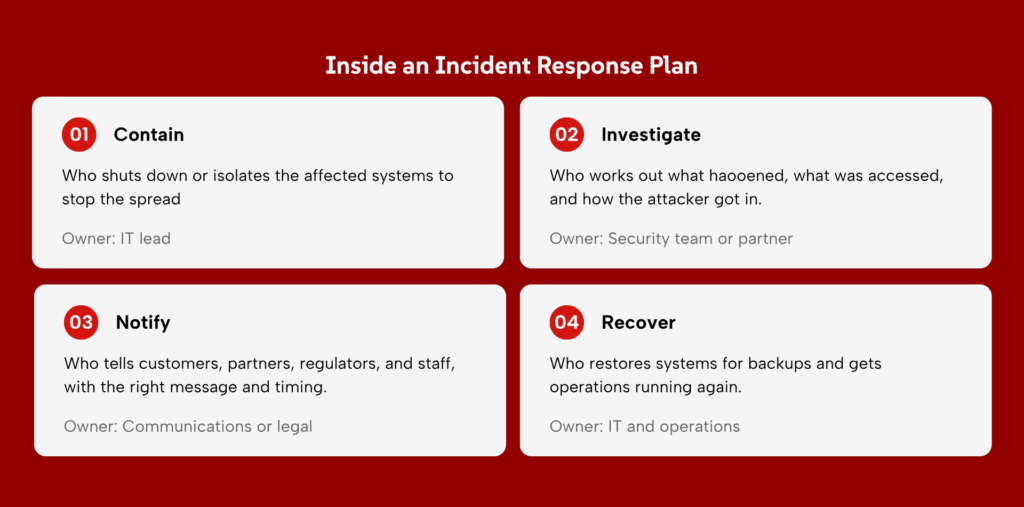
Assume a breach will happen one day, and decide how you will respond before it does. When an attack hits, the businesses that recover fastest are the ones that already know who does what.
A written incident response plan answers the key questions in advance:
- Who shuts down the affected systems
- Who tells customers, partners, and regulators
- Who gets operations back up and running
Without a plan, your team wastes critical hours figuring this out while the damage grows. Write it down, assign the roles, and practise it at least once a year so it works when you need it.
20. Consider cyber insurance
Even strong defences cannot reduce risk to zero. Cyber insurance covers what is left, helping with the costs that follow an attack:
- Recovery and getting systems back online
- Legal fees and regulatory fines
- Lost income while the business is down
Think of it as a financial safety net, not a replacement for the other 19 tips. In fact, most insurers now expect you to have the basics in place, like MFA and reliable backups, before they will offer cover. The stronger your security, the easier and cheaper the insurance.
Which Should You Do First?
Twenty tips is a lot to take on at once, so do not try. Work in order of impact, starting with the few controls that stop the widest range of attacks for the least effort, then building outward.
Start with the essentials. These five block the most common attacks and cost little to set up:
- Multi-factor authentication
- Strong passwords and a password manager
- Regular software updates
- Staff training
- Tested backups
Then build out your defences. Once the basics hold, add the layers that contain an attack and protect your data.
Then mature your programme. With the foundations in place, move to the practices that find and manage risk over time.
The principle is simple: fix the highest-impact gaps first, and build your security up over time rather than all at once. A small business might stop after the essentials. A larger one will work through every tier. Either way, start where the risk is greatest.
Turn Best Practices Into Real Protection
Knowing these 20 tips is the easy part. Putting them in place across every system, and keeping them running as threats change, is the real work. Most businesses do not have the time or the in-house team to manage all of it alone.
That is where Zentara comes in.
We help organisations turn these practices into a security programme that holds, through a Managed SOC that monitors your systems around the clock and responds the moment something looks wrong, and VAPT that tests your defences the way a real attacker would, so you fix the gaps that matter before someone else finds them.
If you are deciding where to start, talk to our team and we will help you map your first move.