

Most guides describe ransomware as software that locks your files until you pay. That description is a decade out of date, and believing it is exactly what gets businesses caught.
Modern ransomware doesn’t just lock your data. It steals it first, then encrypts what’s left, then threatens to publish everything if you don’t pay. A clean backup, once the standard answer, no longer makes the problem go away.
For businesses across Southeast Asia, where digital operations are growing faster than the security around them, understanding how ransomware actually works today is the difference between a contained incident and a company-wide crisis.
This article explains what ransomware is, how an attack unfolds, how it gets in, what makes the current generation so dangerous, and the specific steps that reduce your risk.
What Is Ransomware?
Ransomware definition is malicious software that blocks access to your data or systems, usually by encrypting them, until a ransom is paid. The attacker holds your files hostage and demands payment in exchange for the key to unlock them.
That’s the classic definition, and it’s still half true. What’s changed is the business model behind it. Ransomware today is run like an industry, with specialist groups, rented tools, and negotiated payouts.
The leverage has shifted. Attackers no longer rely only on locking your files, because they’ve learned that a company with good backups can simply restore and refuse to pay. So they steal the data before encrypting it, which gives them a second form of pressure: pay, or we leak everything.
The result is that ransomware has become one of the most damaging and common threats businesses face. According to Verizon’s 2025 Data Breach Investigations Report, ransomware was present in 44% of all breaches analysed, a sharp rise from the year before.
How a Ransomware Attack Works
A ransomware attack isn’t a single moment. It’s a sequence that often unfolds over days, and the encryption everyone associates with ransomware is the very last step. Understanding the sequence shows why early detection matters so much.
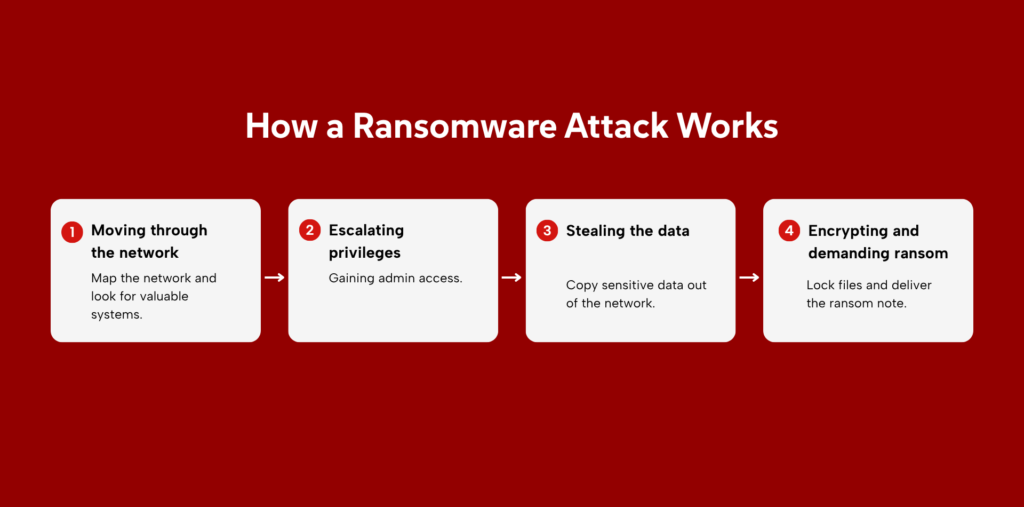
1. Moving through the network
Once an attacker gains an initial foothold, covered in the entry points below, they rarely trigger anything right away. They move quietly from the first compromised device, mapping the network and looking for valuable systems (file servers, databases, backups, and the accounts that control them).
This stage can last hours or days, and it’s often invisible to a business that isn’t watching for it. It’s also the best window to catch an attack before real damage is done.
2. Escalating privileges
To do maximum damage, the attacker needs more than one ordinary account. They work toward administrator-level access, the credentials that let them disable security tools, reach backup systems, and push their payload across the whole environment. Privilege escalation is the step that turns a single compromised login into control of the entire network.
3. Stealing the data
Before encrypting anything, modern attackers copy sensitive data out of the network: customer records, financial documents, contracts, personal information. This is the step that powers modern extortion, and it’s the reason backups alone no longer protect you. Even if you can restore every file, the attacker still holds a copy of your data and the threat to publish it.
4. Encrypting and demanding ransom
Only now does the attacker trigger encryption, locking files across every system they’ve reached, and delivering the ransom note. By this point the damage is already done twice over: the data is both stolen and locked. The note demands payment for the decryption key and, increasingly, for a promise not to leak the stolen files, a promise that carries no guarantee.
Types of Ransomware
Ransomware is usually grouped into two main types, based on how it holds your system hostage.
1. Encrypting ransomware
The most common and most damaging type. It encrypts your files and folders so they can’t be opened without a decryption key held by the attacker. The underlying device still works, but the data on it is scrambled and useless until it’s decrypted. Most major ransomware attacks, including the ones covered later in this article, are encrypting ransomware
2. Locker ransomware
Locker ransomware locks you out of the device or operating system entirely, rather than encrypting individual files. A victim typically sees a full-screen ransom message and can’t get past it to use the machine.
It’s generally less damaging than encrypting ransomware, because the underlying files are often still intact and recoverable, but it still halts whatever the locked device was being used for.
Common Ransomware Entry Points
Ransomware rarely breaks in by force. It usually walks through a door someone left open. These are the most common ways it reaches a network.
1. Phishing and social engineering
The most common entry point. A single employee opens a malicious attachment, clicks a link, or is manipulated into handing over a password, and the attacker has a foothold. Because this is where so many ransomware attacks begin, the human layer is the doorway worth defending first.
Read More: What Is Social Engineering? Types and Real-World Attacks
2. Stolen and weak credentials
Attackers often log in rather than break in, using credentials bought on criminal markets, reused across services, or captured through phishing. Without strong authentication, one valid username and password is all it takes.
3. Exposed remote access (RDP)
Remote Desktop Protocol (RDP) lets staff access systems from elsewhere, but when it’s left exposed to the internet, it becomes an open target. Attackers scan for exposed RDP connections and force their way in with stolen or guessed passwords, then deploy ransomware directly.
4. Unpatched vulnerabilities
Known flaws in software, VPNs, and public-facing applications give attackers a direct path in when they haven’t been fixed. Many major campaigns exploit vulnerabilities for which a patch was already available but not yet applied, turning a known problem into an open door.
5. Supply-chain and third-party access
Attackers increasingly compromise a trusted vendor, software provider, or service partner to reach the real targets downstream. One provider’s breach can cascade across every organisation that depends on it.
What Makes Modern Ransomware Dangerous
The ransomware most guides describe, lock the files and pay for the key, barely exists in isolation anymore. Today’s attacks are built to leave you with no good options.
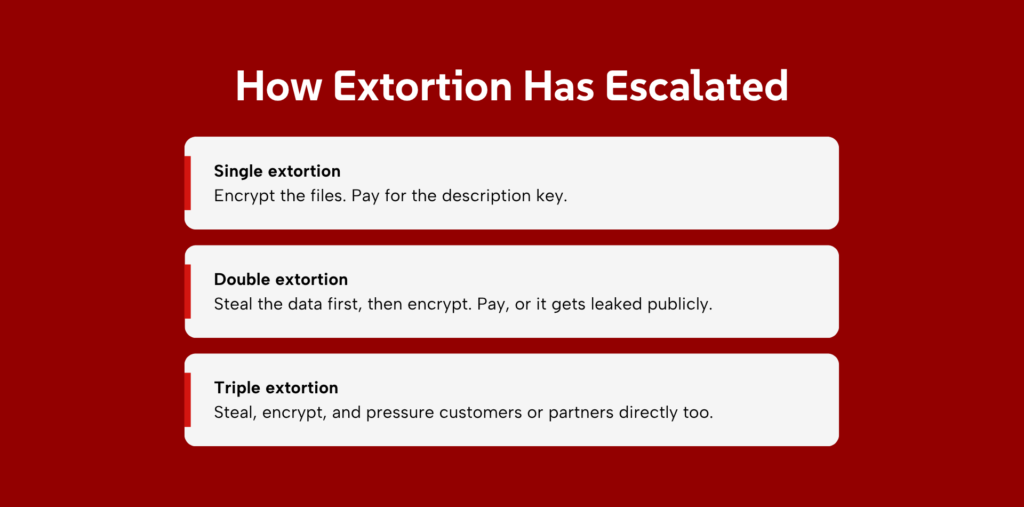
1. Double Extortion
Attackers steal your data before encrypting it, then threaten to leak it publicly if you don’t pay. This breaks the old defence playbook. Even a perfect backup restores your files but does nothing to stop your sensitive data from being published.
Paying for a decryption key no longer buys back your privacy, which is why backups, while essential, are no longer a complete answer.
2. Triple Extortion
The pressure extends beyond your organisation to your customers, patients, or partners whose data was caught in the breach. Attackers contact them directly, or threaten to, and sometimes add other tactics like denial-of-service attacks to increase the pressure. One incident becomes many, and the reputational damage multiplies.
3. Ransomware-as-a-Service (RaaS)
Ransomware is now sold as a subscription. Skilled developers build the malware and rent it to affiliates who carry out the attacks, splitting the proceeds. The effect is more attackers, far less technical skill required to launch an attack, and a steep rise in overall attack volume. It has turned ransomware from a niche crime into a scalable business.
4. AI-Assisted Attacks
Attackers are using automation and AI to work faster and more convincingly: writing more believable phishing lures, finding weaknesses quicker, and speeding up the path from break-in to encryption. The window defenders have to detect and stop an attack is shrinking, which raises the value of early detection even further.
The Business Impact of Ransomware
The ransom itself is often the smallest line item. The real cost shows up in everything around it.’
1. Financial loss
The direct costs stack up fast: the ransom, if paid, plus system restoration, incident response, legal fees, and lost business during downtime.
According to IBM’s 2025 Cost of a Data Breach Report, breaches involving ransomware carry some of the highest costs of any attack type. And as the examples below show, the ransom is often a fraction of the total damage.
2. Operational disruption
An attack that reaches core systems can halt the business entirely. When ransomware locks up the tools a company runs on, staff fall back to manual processes or stop work altogether, and every hour of downtime costs revenue. For businesses that depend on a single critical system, an outage can mean a complete standstill.
3. Data breach and regulatory exposure
Because modern ransomware steals data before encrypting it, an attack is almost always a data breach as well. That carries legal weight.
Under Indonesia’s Personal Data Protection Law (UU PDP), organisations must protect personal data and notify authorities and affected people after a breach, within 72 hours, with fines reaching up to 2% of annual revenue. A ransomware incident quickly becomes a regulatory matter, not just a technical one.
4. Reputational damage
Trust is slow to build and quick to lose. When customers learn their data was stolen, or when a business can’t operate for days, the damage outlasts the incident itself. Partners reconsider, customers leave, and the question of whether their data is safe with you can linger long after systems are restored.
Real-World Ransomware Examples
Two attacks from 2024 show how far the damage reaches, and how the modern playbook works in practice.
1. The Indonesia National Data Center Attack (2024)
In June 2024, a ransomware variant called Brain Cipher struck one of Indonesia’s Temporary National Data Centers (PDNS), disrupting more than 280 public services, including immigration, airport, and passport systems, for days.
According to Indonesia’s National Cyber and Crypto Agency (BSSN), a forensic investigation found the attackers gained access through negligent password management by a government employee.
The attackers demanded $8 million and the government refused to pay. What turned the breach into a near-catastrophe was one detail: officials confirmed 98% of the data had not been backed up. The attackers eventually released the key for free, but the case shows how a single weak credential and a missing backup can paralyze a nation’s services.
2. The Change Healthcare Attack (2024)
In February 2024, Change Healthcare, a UnitedHealth subsidiary that processes a large share of US medical claims, was hit by the BlackCat ransomware group in what became the most disruptive cyberattack on the US healthcare system to date.
The entry point was simple: attackers used stolen credentials to access a remote portal that was not protected by multi-factor authentication. From there they moved through the network, stole roughly 6TB of data, and encrypted Change Healthcare’s systems.
The fallout was enormous. The outage disrupted claims and payments at hospitals and pharmacies across the country for weeks. Change Healthcare paid a ransom of about $22 million, and, in a detail that captures the reality of paying, did not get its data back: the group took the money and a second group later threatened to leak the same data.
Parent company UnitedHealth reported the attack cost it $872 million in the first quarter alone, with total costs projected to exceed $1.5 billion for the year. The lesson is stark. A single portal without multi-factor authentication led to one of the costliest breaches in history.
3. The CDK Global Attack (2024)
In June 2024, CDK Global, a software provider whose systems roughly 15,000 car dealerships across North America rely on, was hit by the BlackSuit ransomware group. To contain the damage, CDK took its core systems offline, and with them went the daily operations of half the continent’s auto dealerships. Sales, financing, and service records became inaccessible, forcing dealerships back to pen and paper for nearly two weeks.
This is supply-chain risk in its clearest form: one vendor compromised, thousands of businesses paralysed. CDK reportedly paid a ransom of about $25 million, but the ransom was almost incidental next to the wider cost.
The Anderson Economic Group estimated the affected dealerships lost more than $1 billion collectively during the outage, many times the ransom amount. It’s a reminder that when a critical provider goes down, the damage lands on everyone connected to it.
How to Protect Your Business from Ransomware
No single control stops ransomware. defence works in layers, and these are ordered by how much protection they give relative to the effort involved.
1. Maintain tested and isolated backups
Backups are the one control that directly defeats the encryption leverage. If you can restore your systems, you don’t need the attacker’s key. But two details matter. Backups must be isolated, kept offline or otherwise out of reach, because attackers deliberately seek out and destroy connected backups before encrypting.
They must be tested, because a backup you’ve never tried to restore is a guess, not a safety net. Note the limit: backups protect against encryption, not against the theft of your data.
2. Enforce phishing-resistant MFA
Multi-factor authentication (MFA) adds a second check beyond a password, and it directly blocks the stolen-credential path that so many attacks use. Use phishing-resistant methods like hardware keys or passkeys rather than SMS codes, which can be intercepted.
3. Patch and reduce your attack surface
Attackers exploit known vulnerabilities faster than many organisations patch them. Keep software, VPNs, and public-facing systems up to date, and prioritize the flaws attackers are actively using. Reduce what’s exposed in the first place: close off unnecessary internet-facing services, especially exposed remote access.
4. Segment your network
Divide your network so that a breach in one area can’t spread freely to the rest. Segmentation limits how far an attacker can move after gaining a foothold, and it can be the difference between losing one system and losing everything. It also buys time for detection to catch the intruder before they reach critical systems.
5. Apply least-privilege access
Give each account and user only the access their role requires. When an account is compromised, least privilege limits how far the attacker can reach and how quickly they can escalate to the administrator rights they need to deploy ransomware widely.
6. Monitor for early signs of intrusion
Because a ransomware attack moves through your network for hours or days before encrypting anything, that window is your best chance to stop it.
Continuous monitoring for unusual logins, abnormal access patterns, and lateral movement is what turns that window into a save. The attacks that cause the most damage are the ones that go unnoticed until the files lock.
Building Ransomware Resilience
Ransomware works because of the gap between the moment an attacker gets in and the moment anyone notices. That gap is often days, and it’s where a manageable intrusion turns into an encrypted, exfiltrated, business-stopping crisis. Prevention narrows the odds of an attacker getting in. It doesn’t close the gap once they do.
Closing that gap is what Zentara’s Managed SOC does.
Our certified analysts monitor your environment around the clock, hunting for the lateral movement and unusual activity that signal an attack in progress, and responding to critical threats within 15 minutes, well before encryption. You get a full security operations center watching for the early signs, without the cost and time of building one yourself.
Not sure how long an attacker could move through your systems before anyone noticed? Talk to Zentara and find out.
Frequently Asked Questions
1. What is the difference between ransomware and malware?
Malware is the broad category of malicious software, including viruses, spyware, and trojans. Ransomware is one specific type of malware that encrypts or locks your data and demands payment to release it. All ransomware is malware, but not all malware is ransomware.
2. Should I pay the ransom?
Most authorities advise against it. Paying doesn’t guarantee you’ll get your data back, funds further crime, and marks you as a likely repeat target. Change Healthcare paid $22 million and still did not recover its data.
3. Can you remove ransomware without paying?
Sometimes. With clean, isolated backups you can restore systems without paying, and free decryption tools exist for some older ransomware families. But with modern double extortion, removing the ransomware doesn’t undo the data theft, so the leak threat remains a separate problem.
4. Do backups protect against ransomware?
Backups are essential but no longer a complete answer. They let you restore encrypted files without paying, which defeats the classic attack, but they don’t stop attackers from leaking the data they stole first. That’s why backups must be paired with prevention and detection.
5. How long does a ransomware attack take?
It varies, but the trend is toward speed. An attacker may spend hours or days moving quietly through a network before encrypting, though some modern attacks compress this to under a day. That quiet period is exactly the window where monitoring can detect and stop the attack.
6. How does ransomware get into a network?
The most common routes are phishing and social engineering, stolen or weak credentials, exposed remote access, unpatched vulnerabilities, and compromised third-party providers. Most attacks begin with one of these rather than a sophisticated exploit, which is why the basics of prevention matter so much.