

Most security gaps aren’t sophisticated. They’re a dormant admin account, an unpatched server, a backup nobody has tested since it was configured. Each one is boring on its own, and each one is how attackers get in.
A cybersecurity audit checklist gives you a repeatable way to find those gaps. Work through it section by section, note what’s missing, fix what you find. This article covers the full checklist, how to run it, and the mistakes that make audits useless. There’s a free PDF template at the end.
What Is a Cybersecurity Audit?
A cybersecurity audit is a structured review of your security controls against a defined standard. It checks whether the protections you believe you have are configured correctly and actually running.
The word “structured” is the important one. This isn’t a scan or a gut check. An audit follows a defined scope, examines evidence, and produces a documented result for each control: working, weak, or missing.
You end up with a ranked list of gaps you can act on. That’s the difference between believing your locks work and testing every door.
Why You Need a Cybersecurity Audit
1. Find gaps before they’re a problem
An audit looks for the same weaknesses an attacker would, on your schedule instead of theirs. It maps your systems, checks the controls protecting them, and flags what’s missing while you still have time.
The difference is cost. A gap found in an audit is a remediation ticket. The same gap found by an attacker is an incident response, a breach notification, and often a regulatory investigation.
2. Most breaches start with small issues
Attackers rarely need a zero-day. They need one account that was never disabled, one server that missed a patch cycle, one storage bucket left public during a migration.
The data backs this up. Verizon’s DBIR consistently finds that the reliable paths into an organisation are unpatched vulnerabilities, weak or stolen credentials, and social engineering. None of those require sophistication.
These are unglamorous problems, which is exactly why they survive. Nobody prioritises the boring fix until it becomes the entry point. An audit finds them while they’re still boring.
3. Security needs regular checking
Your environment drifts. New systems come online, staff change roles, a control gets disabled during maintenance and never re-enabled. Security accurate in January is not security accurate in July.
Regular auditing catches that drift. It turns security from a state you achieved once into something you verify on a rhythm.
Cybersecurity Audit Checklist
Work through this checklist in order, and mark each item as in place, partial, or missing. Partial is the answer that matters most, because it’s where teams assume they’re covered and aren’t.
1. Strengthen Access and Passwords
- Turn on multi-factor authentication everywhere
- Enforce strong, unique passwords
- Remove access for former employees promptly
- Apply least-privilege access
2. Secure Your Network and Devices
- Keep software and systems patched
- Configure firewalls properly
- Secure your Wi-Fi and remote access
- Encrypt sensitive data
3. Stengthen Your Backup and Recovery
- Follow the 3-2-1 backup rule
- Test your backups regularly
- Write an incident response plan
4. Prepare Your People
- Run regular security awareness training
- Teach staff to recognise phishing
- Make it safe to report mistakes
5. Monitor and Respond
- Watch for unusual activity
- Keep and review security logs
- Run vulnerability scans regularly
6. Review Your Vendors and Third Parties
- Assess vendor security before onboarding
- Review contracts for security requirements
7. Document and Review Regularly
- Schedule this checklist as a recurring habit
The full version is available as a free PDF template,, with columns to mark each one and assign an owner and a fix-by date. It’s built to be filled in rather than read, so print it and work through it with your team.
How to Use This Checklist
Start with one section rather than the whole thing. Access and passwords is the usual first choice, because it covers the most common breach path and the fixes are quick.
Mark every item honestly. “Partial” is more useful than a generous “in place”, because partial is where the real gaps hide: MFA on most systems, patching on most servers, offboarding most of the time.
Then assign each gap an owner and a date. A finding without a name against it doesn’t get fixed. Track them like any other work, in the same system your team already uses.
How Often Should You Run It?
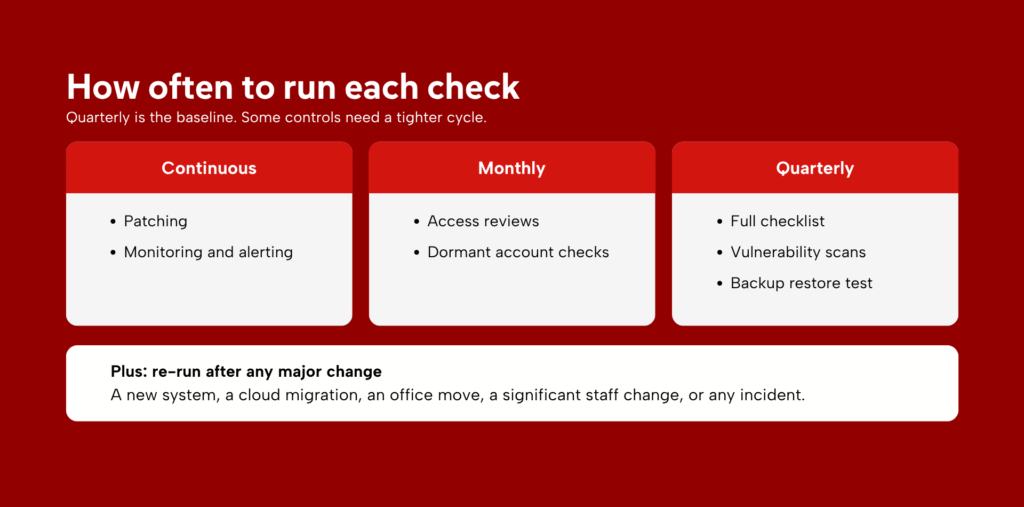
Quarterly is the working baseline for the full checklist. That’s frequent enough to catch drift and light enough that teams keep doing it.
Some items need a tighter cycle. Access reviews suit monthly checks, patching should be continuous, and vulnerability scans belong on a fixed schedule rather than an annual one.
Run it again after any major change: a new system, a cloud migration, an office move, or a significant staff change. And run it after any incident, to confirm the entry point is genuinely closed.
Common Cybersecurity Audit Mistakes
1. Marking issues fixed without verifying
Someone raises a ticket, an engineer applies a change, the ticket closes, the checklist gets ticked. Nobody goes back to the live system to confirm the control is actually running.
This is how organisations end up with documented protections that aren’t there. A firewall rule gets added but sits below a broader permissive rule. MFA gets enabled but with an exemption group nobody removed. Check the fix in the running system, not in the ticket.
2. Treating it as a one-time task
A completed checklist describes the day you completed it. Your environment doesn’t hold still: new systems come online, staff change roles, a control gets disabled during maintenance.
Within a quarter, an unrepeated checklist is a historical document. Put the next run in the calendar before you file the current one, with a named owner attached. The date and the name are what turn it into a habit rather than a project.
3. Trying to check everything at once
Teams that block out a day for all seven sections usually stall around section three. The early sections get proper attention, the later ones get rushed, and the whole thing gets abandoned before vendors or monitoring.
One section per sitting finishes. Spread across a few weeks, each section gets real scrutiny, and the gaps you find are ones you can act on immediately rather than adding to a backlog of 58 findings you’ll never work through.
4. Assuming compliance means secure
Passing an audit means you met the minimum a standard defines. Standards are written to apply broadly, which means they set a floor rather than describing what your specific environment needs.
Attackers don’t work from your compliance scope. A system that’s out of scope for PCI DSS is still a route into your network. Treat the certificate as evidence you cleared a bar, not as evidence you’re secure.
5. Skipping the follow-up
The checklist produces a list of gaps. Everything of value happens after that: assigning owners, setting dates, closing items, verifying the closures.
An audit with no remediation phase has cost you a day and changed nothing. Worse, it creates a record showing you knew about a weakness and left it open, which is exactly what regulators look for after an incident.
Turning This Checklist Into Real Protection
A completed checklist leaves you with a set of unticked items. That’s the useful output, and it’s also where most teams stall, because the gaps rarely arrive in a sensible order of priority.
Some of what you found is straightforward. Enabling MFA, disabling dormant accounts, and closing unused ports are same-week fixes, and they close the most commonly exploited paths. Sequence those first.
The rest takes longer, and it tends to be the same three areas: network segmentation, log review, and backup testing. Each needs a named owner and a defined schedule, because these are the controls that determine whether an incident stays contained.
Zentara works with organisations at exactly this point. VAPT answers the question a checklist cannot, which is whether a control holds when someone actively attacks it. Managed SOC covers the continuous log review most internal teams never reach.
If your checklist raised more than you can sequence internally, grab a time with our specialists and bring the completed template.
Frequently Asked Questions
1. Is this checklist the same as a full cybersecurity audit?
No. This checklist is a self-guided review you can run yourself, while a full cybersecurity audit is a more formal, in-depth process, often done by a professional. Use this checklist to stay sharp between audits, not as a replacement for one.
2. Can I complete this checklist myself, or do I need a professional?
Most items on this list can be checked by an internal IT team without outside help. But for anything you’re unsure about, or before a compliance deadline, it’s worth having a professional confirm your results.
3. What’s the first thing I should check?
Start with access and passwords, specifically multi-factor authentication and removing access for former employees. These are some of the most common ways attackers get in, and they’re quick to check.
4. Is this checklist enough to meet compliance requirements?
On its own, no. Most regulations and standards require a formal audit or assessment with documented evidence, not a self-review. This checklist helps you stay prepared for that audit, but it doesn’t replace it.
5. How long does it take to go through this checklist?
For a small business, a first pass usually takes a few hours to a day. It’s faster on repeat runs, since you’re mainly confirming nothing has changed rather than starting from scratch.