
Artificial Intelligence (AI) is now on both sides of the fight. Defenders use it to spot attacks faster. Attackers use it to break in faster.
According to IBM’s 2025 Cost of a Data Breach Report, 16% of breaches now involve attackers using AI tools, while organisations that lean on AI for defence detect and contain breaches around 80 days sooner than those that don’t.
That split is the whole story of AI in cybersecurity. This guide explains what it actually means, where it helps, where it hurts, and how to use it without creating new problems. No hype, just how it works and what to do about it.
What Is AI in Cybersecurity?
AI in cybersecurity means using software that can learn patterns and make decisions to help protect systems, networks, and data.
Traditional security tools follow fixed rules. If a file matches a known bad signature, block it. That works until an attacker uses something the rule has never seen. AI takes a different approach. Instead of matching known threats one by one, it learns what normal looks like in your environment, then flags what doesn’t fit.
A login from a new country at 3am, a sudden spike in data leaving the network, an email that reads like a known scam pattern: AI can spot these even when there’s no exact rule for them.
AI in Cybersecurity vs AI Security
These two phrases sound the same but mean different things, and mixing them up causes real confusion.
- AI in cybersecurity is using AI to defend. Threat detection, automated response, fraud spotting. AI is the tool.
- AI security is protecting the AI systems themselves. When your company runs a chatbot or an AI assistant, that system becomes something attackers can target. AI security covers things like stopping people from feeding it malicious instructions or stealing the data it was trained on.
Benefits of Using AI in Cybersecurity
Here’s where AI earns its place. These are the areas where it makes a measurable difference, not just a marketing claim.
1. Faster and more accurate threat detection
Security teams drown in alerts. A mid-sized company can generate tens of thousands a day, and most are false alarms. AI sorts the noise from the real threats by learning normal behaviour and flagging the genuine outliers.
IBM found that AI and automation cut the average time to identify and contain a breach significantly, and faster containment was the main reason average breach costs dropped for the first time in five years.
2. Stronger identity and access protection
Stolen logins are now one of the most common ways attackers get in. Reporting cited by DataCouch put compromised identities at the centre of around 60% of incidents in 2025.
Attackers aren’t breaking down the wall; they’re walking through the front door with a stolen key. AI helps by watching how each user normally behaves and raising a flag when an account suddenly acts out of character, even if the password was correct.
3. Smarter endpoint and email defence
Endpoints (laptops, phones, servers) and email are the two places most attacks land. AI-powered email filtering learns from recent attack patterns to catch phishing that older filters miss. On devices, AI watches for behaviour that signals malware, like a program suddenly trying to encrypt every file, rather than waiting to match a known virus.
4. Better visibility across the cloud
Most companies now run across cloud, on-premises systems, and a mix of devices. That sprawl creates blind spots. AI tools pull signals from all of these places into one view and connect the dots between events that, on their own, look harmless, but together signal an attack in progress.
5. Focused vulnerability management
Every system has more weaknesses than any team can fix at once. The hard question isn’t finding them; it’s knowing which to fix first. AI helps rank vulnerabilities by which are actually being exploited in the wild and which sit on your most important systems, so limited time goes where it matters.
6. Faster incident response
When something does get through, speed decides how bad it gets. AI can take first steps on its own: isolating an infected device, disabling a compromised account, or gathering the evidence a human responder needs. A 2025 ISACA SOC survey cited by DataCouch found teams using AI investigation tools alongside detection cut their time to contain incidents by 38%.
7. Real-time fraud detection
For banks and online stores, fraud happens the moment a transaction goes through. AI models score transactions as they happen, weighing dozens of signals at once to spot the ones that don’t add up, and they do it fast enough to stop a fraudulent payment before it completes.
The Four Key Components
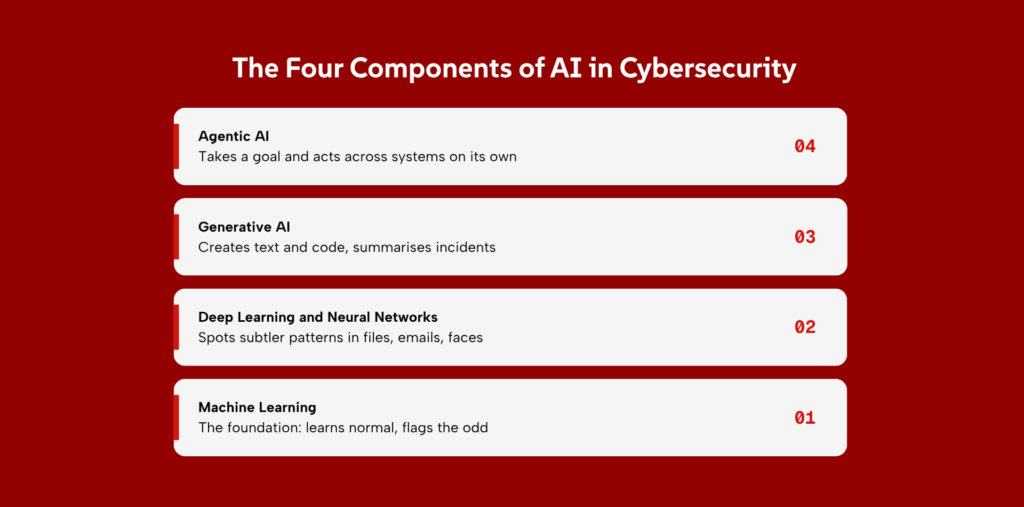
“AI” is an umbrella word. Under it sit several different technologies, each doing a different job. Knowing them apart helps you understand what a security tool is really doing.
1. Machine Learning
Machine learning is the foundation. You feed a system lots of examples, and it learns the patterns rather than being told explicit rules.
In security, this is what powers most anomaly detection: the system learns what normal network traffic looks like, then notices when something deviates. It’s mature, well understood, and already inside most modern security tools.
2. Deep Learning and Neural Networks
Deep learning is a more advanced form of machine learning, loosely modelled on how the brain’s neurons connect. It handles messier, more complex data: spotting malware hidden inside files, analysing the fine details of an email to judge whether it’s a scam, or recognising a face or voice. It needs more data and more computing power than basic machine learning, but it catches subtler patterns.
3. Generative AI
Generative AI is the technology behind tools like ChatGPT. It creates new content: text, code, images. In security, defenders use it to summarise complex incidents in plain language, draft response steps, and help analysts query their systems by just asking a question.
The flip side: attackers use the same technology to write convincing phishing emails and malicious code, which we’ll cover below.
4. Agentic AI
Agentic AI is the newest and most significant shift. Instead of just answering a question, an AI agent can take a goal and carry out a series of steps on its own: investigate an alert, gather data from several systems, decide what’s happening, and act.
Trend Micro’s 2026 predictions describe agentic AI handling whole chunks of work that used to need a human. This is powerful for defence, but as we’ll see, it’s also becoming a serious new risk on both the attack and the defence side.
How Attackers Use AI
AI doesn’t only help defenders. The same capabilities that speed up defence also lower the skill and cost needed to attack. This is the honest part most vendors skip.
1. More convincing phishing emails
The old advice was to watch for bad spelling and clumsy grammar. That advice is dead. Generative AI writes clean, personalised phishing emails at scale, often using details scraped from social media or stolen data. IBM’s data attributes 37% of AI-related breach incidents to AI-generated phishing.
2. Deepfake voice and video scams
Attackers now clone voices and faces. In one widely reported case, an employee was tricked into transferring funds during a video call where every other “person” on the call was an AI-generated deepfake of company executives. These scams target the one thing technology can’t fully patch: human trust.
3. Automated hacking and reconnaissance
Before an attack, criminals study their target. AI automates that homework, mapping a company’s systems and finding weak points far faster than a human could. Trend Micro notes attackers using AI to map entire networks with high accuracy before striking.
4. Malware that changes to avoid detection
Polymorphic malware rewrites its own code each time it spreads, so it never looks the same twice. That defeats security tools that hunt for a fixed signature. AI makes this kind of shape-shifting malware easier to produce and harder to catch.
5. AI-driven hunting for vulnerabilities
Attackers point AI at software to find unknown weaknesses faster than defenders can patch them. The result is a shrinking window between a flaw being discovered and being exploited.
6. Account takeover at scale
By combining stolen credentials with AI that mimics normal user behaviour, attackers can take over many accounts at once while staying under the radar of older detection methods. This is why identity-focused defence matters so much now.
Risks and Limits of AI in Cybersecurity
AI is a strong tool, not a magic shield. Using it well means knowing where it falls short.
1. Trusting AI too much
The biggest risk is treating AI’s output as automatically correct. AI is a co-pilot, not an autopilot. A tool that’s right most of the time can lull a team into rubber-stamping its decisions, and that’s exactly when a wrong call slips through.
2. Bias in the data AI learns from
AI learns from the data it’s given. If that data is incomplete or skewed, the AI inherits the gaps. A model trained mostly on one kind of traffic may miss threats that look different, or flag harmless activity as dangerous, wasting a team’s time.
3. AI that makes confident mistakes
Generative AI can sometimes give answers that sound correct but are actually wrong. These AI hallucinations can mislead security teams, sending them after the wrong problem while real threats go unnoticed. That’s why AI outputs should always be verified, not blindly trusted.
Read More: AI Hallucinations in Critical Systems: Detection and Mitigation.
4. Sensitive data leaking through AI prompts
When staff paste confidential information into public AI tools to get help, that data can leave your control. IBM found that “shadow AI”, unapproved AI tools used by employees, added an average of USD 670,000 to the cost of a breach. The fix is governance, which we’ll cover.
5. Losing security skills by relying on AI
If junior analysts let AI do all the thinking, they never build the instincts that make a senior analyst valuable. Over-reliance can quietly hollow out a team’s core skills, leaving it helpless when the AI is wrong or unavailable.
Challenges When Adopting AI in Cybersecurity
Even when you decide AI is worth it, getting it working is its own project. These are the hurdles most teams hit.
1. Cost and complexity of AI tools
Good AI security tools cost money, and the more advanced ones need real expertise to set up and tune. For smaller organisations, the price and complexity can be a barrier, though managed services lower that bar.
2. Integrating AI with existing security systems
AI tools rarely work in isolation. They need to plug into the firewalls, email systems, and monitoring tools you already run. If they don’t talk to each other, you get more blind spots, not fewer.
3. Finding skilled people to run it
There’s a well-documented shortage of people who understand both security and AI. The skills gap is a growing contributor to breach costs. Buying the tool is the easy part; staffing it is harder.
4. Managing AI governance and compliance
Who’s allowed to use which AI tools, on what data, and how do you prove it to a regulator?
Without clear rules, AI adoption races ahead of oversight. IBM found that 97% of organisations that suffered an AI-related incident lacked proper AI access controls.
5. Balancing speed with human oversight
AI can act in milliseconds. But letting it act fully on its own risks costly mistakes, while requiring a human to approve everything throws away the speed advantage. Finding the right line between the two is an ongoing balance, not a one-time setting.
AI-Powered Cybersecurity Tools
AI isn’t a separate product you buy once. It’s built into the main categories of security tools. Here’s where it shows up.
1. Firewalls and network monitoring
Modern firewalls and network tools use AI to spot unusual traffic patterns, not just block known bad addresses. They learn the rhythm of your network and flag what breaks it.
2. Endpoint Protection (EDR and XDR)
EDR (Endpoint Detection and Response) watches individual devices for signs of compromise. XDR (Extended Detection and Response) widens that view across email, cloud, and network too.
AI is the engine that connects events across all of them into a single picture of an attack.
3. Security analytics and SIEM tools
A SIEM (Security Information and Event Management) tool collects logs from across your systems. The problem has always been volume: too much data, too many alerts. AI helps by correlating events and surfacing the handful that actually matter, which is the core of how a modern Security Operations Center works.
4. Identity and access tools
Because stolen identities drive so many attacks, identity tools now use AI to score the risk of each login and access request in real time, stepping up checks when something looks off.
5. AI assistants for security teams
Newer tools give analysts a generative AI assistant: ask a plain-language question about an incident and get a clear summary and suggested next steps. This speeds up investigation and helps less-experienced staff work more effectively, as long as a human still checks the work.
Best Practices for Using AI in Cybersecurity
Buying AI tools is easy. Using them well takes discipline. These practices keep AI an asset rather than a liability.
1. Start with the problem, not the tool
Don’t buy AI because it’s the trend. Start with your actual weak spot: too many alerts, slow response, repeat phishing. Pick the tool that fixes that specific problem. A tool bought to look modern usually ends up unused.
2. Integrate AI across your security setup
AI works best when it can see everything. It delivers the most value when it’s woven through the whole security lifecycle, not bolted on as one isolated product. Connect it to your existing systems so it has the full picture.
3. Protect the data your AI uses
The data feeding your AI is now a target. Control who can access it, encrypt sensitive information, and watch for the prompt-based attacks that try to trick AI into leaking what it knows. Protecting the AI is part of using the AI.
4. Keep humans in the decision loop
Let AI handle the speed and the volume. Let humans handle the judgment, especially for high-stakes actions like shutting down a system or blocking a major account. The goal is AI that supports your team’s decisions, not one that replaces them.
5. Test and audit regularly
An AI model that worked last year may drift as threats and your own systems change. Test it regularly to confirm it still catches what it should. Keep an audit trail of what it does, both to improve it and to answer regulators.
6. Set clear rules for AI use
Write down which AI tools staff may use, on what data, and what’s off-limits. This single step is what turns risky shadow AI into safe, approved AI, and it’s far cheaper than the breach it prevents.
What’s Next in AI and Cybersecurity
The field is moving fast. A few shifts are worth watching because they’ll shape how you defend over the next few years.
1. AI Agents That Work on Their Own
Agentic AI will take on more of the routine security workload, investigating and responding with less human input. That promises real relief for stretched teams, but it also means the agents themselves must be tightly controlled, because a compromised agent can do damage at machine speed.
2. AI vs AI
The contest is becoming machine against machine: attacking AI probing for weaknesses, defending AI watching for intrusions, both adapting in real time. Human strategy still sets the direction, but more of the moment-to-moment fight will happen between systems.
3. Privacy-Friendly AI
As privacy laws tighten worldwide, expect more AI that can learn and protect without hoovering up personal data. Techniques that let AI work on data without exposing it will grow in importance, especially in regulated sectors like finance and healthcare.
4. New Rules and Regulations on AI
Governments are writing rules for how AI can be built and used, including in security. Indonesia’s own AI guidance is still early and fragmented, but more formal regulation is coming. Building good AI governance now means you won’t be scrambling when the rules arrive.
Building an AI-Ready Security Strategy
Attackers are already using AI and defenders who don’t will fall behind. But bolting on an AI tool without the right foundation just adds risk and cost.
So where do you start?
Start with one weak spot you already know about: too many alerts, slow response times, phishing that keeps getting through. Fix that first, with AI built in where it helps, and make sure it connects to the systems you already run. Protect the data the AI touches. Keep your people deciding the big calls. Write down the rules. Then do the next thing.
Zentara handles this for Indonesian businesses that don’t want to build it alone. Our Managed SOC runs AI-driven monitoring with real analysts behind it, and our VAPT testing checks your systems for weak points, including the ones AI tools can quietly introduce.
Want to know where your defences actually stand? Talk to the Zentara team.
Frequently Asked Questions
1. Will AI replace cybersecurity jobs?
No. AI handles scale and speed, like sorting millions of alerts, but human experts remain essential for strategy, judgment, and the decisions that carry real consequences. The skills shortage in the field suggests demand for good people is rising, not falling.
2. Is it safe to use AI in cybersecurity?
Yes, when it’s done with care. AI is safe and valuable as long as you protect the data it uses, keep humans in control of major decisions, and set clear rules for its use. The risk isn’t AI itself; it’s deploying it without those safeguards.
3. How does generative AI help security teams?
It speeds up the slow, manual parts of the job. Generative AI can summarise a complex incident in plain language, draft response steps, and let an analyst ask questions of their systems in normal words instead of complex queries. This is especially helpful for less-experienced staff, provided a human reviews the output.
4. What’s the difference between AI in cybersecurity and security for AI?
AI in cybersecurity means using AI as a tool to defend your systems. Security for AI means protecting the AI systems you’ve deployed from being attacked, tricked, or misused. As more companies run their own AI tools, the second is becoming just as important as the first.
5. Can small businesses use AI in cybersecurity?
Yes. Much of the AI in modern security tools works out of the box, and managed services put advanced capabilities within reach without needing a large in-house team. A small business doesn’t need to build AI itself; it needs to choose tools and partners that bake it in safely.