

A while ago, I was on my way to approve a pull request for a production ready ML internal microservice. The Machine Learning (ML) team had built a working, performant model and wrapped it in FastAPI. The unit tests were all green. During load testing, some of the tests timed out. So I thought maybe I was being too hard on the concurrent setting. The culprit wasn’t memory leaks or a bad model. It was the async function. If you are serving ML models with FastAPI. There is a good chance that you are probably doing it wrong.
We’ve all been there. You open the FastAPI documentation, and every example starts with async def. It feels modern and fast. Then you think, “I want my API to be non-blocking and highly concurrent, so I should use async everywhere”. So you write this:

The problem is that the python async event loop is single-threaded. It works great for I/O tasks like waiting for a database query or an external API call. It’s like the event loop says, “Okay, while we wait for the DB, I’ll go handle another request”. But ML inference isn’t waiting. It’s working synchronously because it is CPU-bound process.
When you run a heavy matrix multiplication inside an async def function, you are effectively grabbing the event loop by the throat and refusing to let go until the math is done. The event loop can’t check in new guests because it’s busy doing math. Your API isn’t concurrent anymore because it being blocked.
The solution is counter-intuitive, you just need to stop trying to be clever with async. FastAPI has a hidden superpower. If you define your endpoint with a standard def (instead of async def), FastAPI notices. It says, “Hey, this looks like a blocking synchronous function. I shouldn’t run this on the main loop”. It automatically sends that function to a separate thread pool. This means your heavy ML model crunches numbers in a side thread, while the main event loop stays free to accept new connections, return health checks, and keep the lights on. To make this production-grade, we need to do three things:
- Drop async on the endpoint and let the thread pool handle the CPU work.
- Don’t load the model inside the request handler. Loading a 500MB pickle file on every request is architectural suicide. Load it once at startup inside lifespan event.
- Python’s standard json library is slow. We use ORJSONResponse to improve some milliseconds.
Writing the code is only half the battle. You need to run it correctly. Since Python is bound by the Global Interpreter Lock (GIL), a single process can effectively only use one CPU core. If you deploy this to a standard 4-core server and run it with default settings, you are leaving 75% of your computing power on the table.
To fix this, we use uvicorn with multiple workers. The general rule of thumb is (2 * CPU cores) + 1, but for heavy ML models, we prefer starting with 1 worker per core to avoid context-switching overhead. Here is how you run it for a 4-core instance:
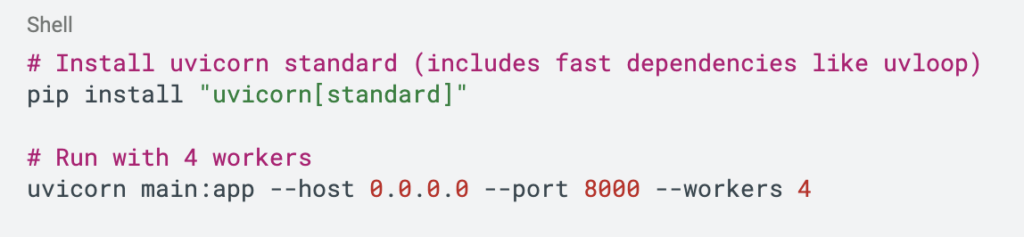
This spins up 4 independent processes. Each has its own copy of the model (memory warning: if your model is 2GB, you now need 8GB RAM) and its own thread pool. Now you’re utilizing the full capacity of your server.